AI refers to smart computer systems that can simulate human decision-making, such as writing content, choosing layouts, and designing visual elements. In web development, this means using AI to build websites by automating design, copy, and structure.
AI can create a website by generating layouts, text, images, and even launching a live version, all based on user input or business type. This process is called automated web development, and it’s transforming how small businesses go online.
Popular AI web tools like Wix ADI, Framer AI, Durable, and 10Web use GPT website generation or similar models to build full sites with minimal effort. These tools allow users to go from a blank prompt to a functioning site within minutes.
The cost benefits of using an AI website builder include lower setup costs, no need for a developer, and bundled features like hosting and SSL. Compared to hiring a designer or agency, it’s faster and far more affordable — starting from as little as £10–£25/month.
Common myths about AI websites include the belief that they’re always ugly, completely free, or ready to publish without editing. In truth, AI builds decent layouts, but still requires human input for branding, SEO, and final polish.
What Is AI?

Artificial intelligence (AI) is a computer system that simulates human intelligence, including learning, reasoning, problem-solving, and even creativity. These systems are built on technologies like machine learning, neural networks, and natural language processing (NLP), allowing them to understand data, improve over time, and generate new outputs.
Examples of AI include ChatGPT (which generates human-like text), Midjourney (which creates realistic images from text prompts), and self-driving cars that interpret traffic and make split-second decisions. These tools fall under what’s called Generative AI or Large Language Models (LLMs), systems trained on massive datasets to produce intelligent results.
In the context of websites, AI is becoming increasingly relevant, not just for generating content, but also for assisting with design, layout decisions, and even entire site builds. That’s where the real transformation begins.
What Exactly Do We Mean By “AI Builds A Website”?
When we say AI builds a website, we mean that AI builds a website when artificial intelligence tools are used to create various parts of a website, from layout and structure to content, imagery, styling, and even live deployment.
“Build” can refer to AI-powered layout suggestions, automated content generation, image creation via tools like DALL·E, or even full code export and hosting through platforms like Webflow AI.
There’s an important difference between AI-assisted web development — where a human guides the process and refines the result — and full web automation, where the AI generates a near-complete product with little input.
In practice, most AI tools fall somewhere in between, enabling co-creation rather than complete replacement.
A typical website generation flow might look like this: a business owner provides a short prompt or description → the AI suggests structure, writes copy, creates images → the system outputs a draft website using automated design principles or no-code tools.
This prompt-to-website pipeline is increasingly common in platforms that integrate AI models like GPT, Figma AI, and Webflow’s generation engine.
Which AI tools Can Create Websites Today?
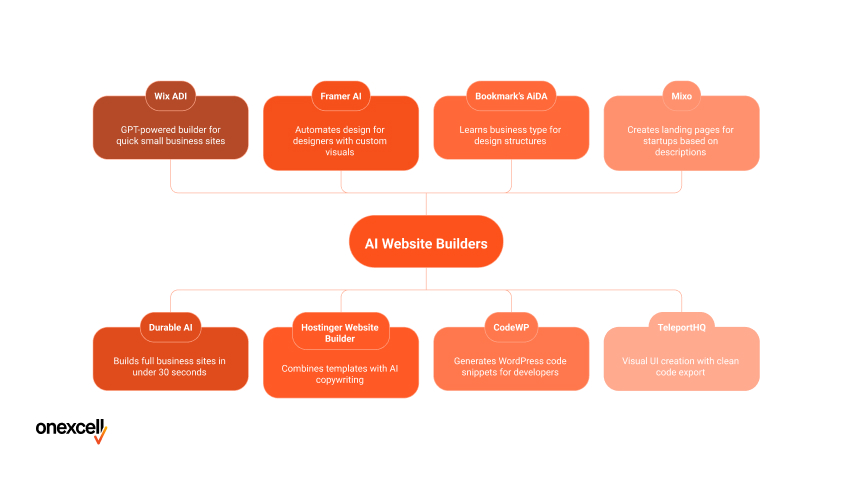
The AI tools that can create websites today include Wix ADI, Bookmark’s AIDA, Framer AI, Durable, and 10Web. These platforms use AI to generate layouts, write content, suggest designs, and in some cases, instantly launch live websites with minimal input.
Here are some of the most popular AI website builder platforms available today
- Wix ADI: Offers fast layout and content generation through its GPT-powered builder. Ideal for small businesses needing a quick, simple web presence.
- Durable AI: Known for building a full business site in under 30 seconds. Great for one-page websites and freelancers.
- Framer AI: A powerful tool for designers who want web design automation with customisable visuals and live publishing.
- Hostinger Website Builder: Combines templates with AI copywriting tools. Useful for non-tech users who want fast deployment.
- Bookmark’s AiDA: Uses artificial intelligence to create design structures based on business type. It learns as you interact with it.
- CodeWP: Focuses on AI-generated WordPress code snippets and page components. Best for developers needing speed.
- Mixo: A startup-focused website generation tool that creates landing pages based on brief descriptions. Offers lead capture integration.
- TeleportHQ: Allows you to create UI visually and export clean code. Integrates well into professional dev pipelines.
Some of these are AI-first platforms (like Durable or Mixo), while others integrate AI as a plug-in or assistant within traditional web builders (like Wix or WordPress tools).
How Good Are AI-built Websites?
AI-built websites are fast to generate, easy to launch, and ideal for simple use cases, but they still come with notable limitations. On the plus side, they offer impressive speed, automation, and straightforward user journeys, making them great for freelancers, local service providers, or MVP projects.
However, many suffer from generic designs, poor accessibility compliance, and SEO structures that fall short of best practice. For instance, Durable AI can build a fully live business site in under 60 seconds; however, the navigation is often shallow, and layout decisions can feel templated or mismatched to the brand tone.
Mobile responsiveness is usually decent, but some AI tools still hallucinate sections, mislabel headings, or generate weak content without a clear hierarchy. These issues can affect UX and discoverability, especially when AI misinterprets the structure of what a user needs.
AI websites are useful for speed and as starting points, but they still require human refinement for professional, long-term use.
What Are The Cost Benefits Of Building A Website With AI?

The cost benefits of building a website with AI include lower upfront pricing, faster turnaround times, and bundled features that reduce ongoing expenses. Most AI site builders like Durable or Wix ADI start from as little as £10–£25/month, often including essentials like hosting, SSL certificates, contact forms, and basic analytics.
Compared to hiring a freelance developer or agency, which in the UK can range from £500 to £5,000+, depending on complexity, AI tools significantly cut costs, especially for startups or temporary projects. You also save on time, since there’s no back-and-forth briefing or manual build process.
That said, some hidden costs can appear down the line. Features like advanced SEO tools, custom app integrations, or premium templates require upgrading to higher-tier plans or purchasing add-ons. It’s important to factor those in when comparing total value.
Need to ask Something else?
Use the form here to send us your question. We’ll reply within one business day.
Can AI Alone Replace Human Website Expertise?
No, AI alone cannot fully replace human website expertise, especially for projects that demand strategy, creativity, and custom functionality. While AI excels at generating layouts and content quickly, it struggles with logic-based interactivity, precise branding, and tailored user experiences that require deep UX research or accessibility planning.
Many successful projects now use a hybrid workflow, where AI handles the initial draft, site structure, visuals, and copy, and humans step in to refine design, test usability, and ensure alignment with business goals.
Tools like Framer AI or Webflow’s GPT integrations rely heavily on prompt engineering. They turn vague inputs into structured output, a skill that still demands human intuition.
So, while AI makes the process faster and more scalable, the need for experienced designers, developers, and strategists remains central to delivering high-quality, future-proof websites.
How Do You Integrate AI Building Into A Full Website Workflow Process?
You integrate AI building into a full website workflow process by using AI tools at the early stages. It is done by generating layouts, copy, or visual concepts, and then refining the output through manual design and development.
This approach blends speed and automation with strategic input, allowing teams to stay efficient without sacrificing quality or brand control.
Here’s a 5-phase step to integrate AI building into a full website workflow process:
1. Ideation & Research: Use tools like ChatGPT, Notion AI, or Copy.ai to brainstorm site structure, generate messaging ideas, and define user personas. This speeds up strategy and helps non-designers shape their vision.
2. Content Generation: Platforms like Jasper, Copy.ai, or ChatGPT help you write homepages, service pages, and CTAs fast. This is especially useful for SME sites that need quality copy without hiring a full-time writer.
3. Layout & Design: Builders like Wix ADI, Durable, Framer AI, or Bookmark’s AiDA can instantly create page structure and styling based on your business type or prompt. These tools handle AI-powered layout, giving you a visual base to tweak.
4. Code Prototyping: Use tools like CodeWP or Uizard to generate code snippets or interactive mockups. Ideal for adding forms, animations, or WordPress components without writing everything from scratch.
5. Final Touches & Deployment: Here’s where human expertise takes over — refining design, doing SEO audits, accessibility checks, speed optimisation, and custom features before launch.
This workflow is flexible; some users start entirely with AI, while others plug it in midway to save time. Either way, AI becomes a powerful co-pilot throughout the website build.
What Does The AI Website Future Hold?
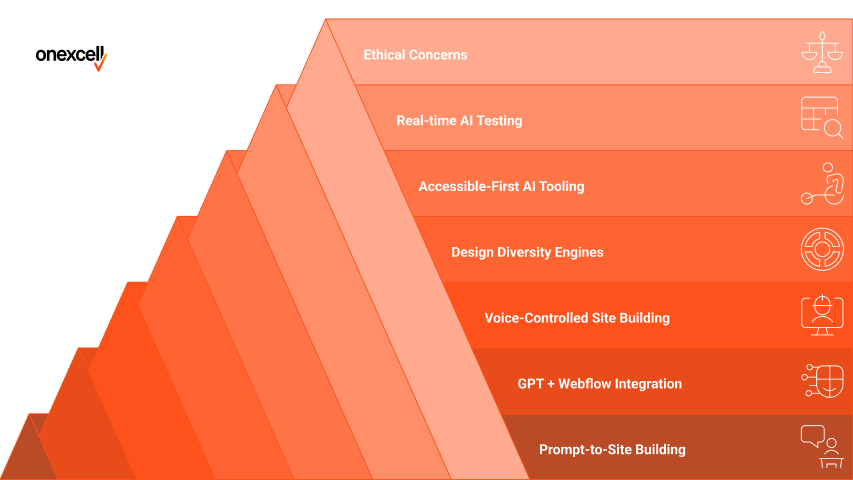
AI websites’ future holds faster site creation, hyper-personalised design, and deeper integration with user behaviour through real-time learning. We can expect tools that not only build but also optimise, test, and adapt websites automatically based on audience data and engagement patterns.
The following are the things an AI website’s future holds:
- Prompt-to-site building becomes standard: You’ll be able to describe your website in plain English, and AI will generate full layouts, images, and content, all in real time.
- GPT + Webflow native integration: Expect platforms like Webflow to embed GPT-style AI directly into their interface, making content, SEO, and layout generation easy.
- Voice-controlled site building: Users will be able to build or update websites through voice commands. “Add a testimonials section below the gallery” becomes a functional design change.
- Design diversity engines: Future AI tools will avoid repetitive templates by learning your brand personality and generating truly unique designs from your brand tone and user goals.
- Accessible-first AI tooling: As inclusivity becomes standard, AI will bake in accessibility features from the start, colour contrast checks, alt text, keyboard navigation, without needing separate audits.
- Real-time AI testing and optimisation: AI will not just build, but also test versions, gather data, and tweak design and content based on user interactions. All autonomously.
- Ethical concerns will rise: Issues around bias in training data, hallucinated content, or ownership of AI-generated assets will demand better governance and transparency.
What Are The Common Myths About AI Web Builders?
The common myths about AI web builders are that they can fully replace human designers, always produce professional results, and work perfectly without guidance. In reality, they still require input, oversight, and refinement to meet branding, SEO, and accessibility standards.
The common myths about AI web builders include the following:
- AI websites are always ugly: Not true, many AI tools now produce clean, modern layouts using design principles like spacing, colour harmony, and mobile responsiveness. The catch is that they often default to safe, generic templates, so human input is still needed for originality and brand polish.
- AI makes websites for free: While some platforms offer free trials or basic versions, most AI web builders come with subscription fees or unlock key features only on paid tiers. Users should watch for hidden costs like premium templates, SEO add-ons, or custom domain linking.
- AI understands your brand perfectly: AI tools rely on prompts and limited datasets. They don’t have emotional context or deep brand knowledge. Unless you provide clear inputs or do manual tweaking, the output may miss your tone, values, or unique identity.
- You don’t need to edit anything: AI-generated sites still require content revision, layout checks, and compliance auditing before going live. The promise of one-click publishing is appealing, but skipping human review can lead to errors, weak messaging, or poor UX.
What Questions Should You Ask Before Letting AI Build Your Site?
The questions you should ask before letting AI build your site include what your website’s purpose is, what features you’ll need, and how flexible the platform is for future edits or migration. These questions help you choose the right tool and avoid hitting limitations after launch.
Ask the following questions before letting AI build your site:
- What is the primary goal of the site? Is it a quick MVP (minimum viable product), a one-page lead magnet, or a full brand experience? Your answer will shape which AI tool is suitable.
- Do I need features like e-commerce, member login, or databases? Not all AI builders support advanced functions, such as shopping carts or gated content. Check if these features are natively supported or require third-party apps.
- Can I export the code or migrate later? Some platforms lock you into their ecosystem, while others let you move to custom hosting or export HTML/CSS. This matters if you plan to scale or switch builders later.
- How much time do I have to edit and refine? Even with AI, you’ll need to review design, fix layout quirks, and optimise content. Choose a tool that matches your skill level and availability.
- Does the platform include SEO tools, forms, and analytics? Basic AI-built sites may lack SEO meta fields, contact forms, or Google Analytics integration. These are critical for visibility and tracking performance.
Can AI Create A Fully Functional SEO-Ready Website?
Yes, AI can create a basic SEO-ready website, but it often lacks the depth and nuance needed for strong long-term rankings. While some platforms automatically add page titles, meta descriptions, and mobile responsiveness, they miss key elements like keyword strategy, internal linking, schema markup, or content structure tailored to search intent.
To make an AI-built site truly SEO-functional, you’ll still need manual optimisation, competitor analysis, and technical tweaks. Think of AI as a great starting point, but not a replacement for full SEO planning.
Is AI Site Building Better Than Using Builder Templates?
Yes, AI site building can be better than using static builder templates in terms of speed, personalisation, and reduced decision fatigue. Instead of manually choosing layouts and dragging in blocks, AI tools generate entire pages based on your inputs, saving time and effort.
However, builder templates often offer more control and stability, especially for users who want to customise every detail. AI tools may give you a faster start, but templates offer predictable structure and often better plugin compatibility.
Will AI make My Site Look Generic?
Yes, AI can make your website look generic if you rely solely on default outputs without customisation. Many AI builders reuse layout patterns and visual components that feel repetitive across different businesses.
However, with thoughtful prompts, brand inputs, and some manual tweaks, you can make AI-generated sites feel more tailored and unique. The key is treating AI as a base, not the final design.
Do I Need To Know How To Code If Using An AI Builder?
No, you don’t need to know how to code when using most AI website builders, as they’re designed to work with drag-and-drop interfaces and natural language prompts. These tools fall under the category of no-code platforms, making them ideal for beginners or non-technical users.
Knowing a bit of HTML or CSS helps if you want to tweak styles, embed custom features, or fix layout quirks the AI didn’t get right. But for most users, coding is completely optional.
Are AI-built sites Safe And Fast Enough For Business Use?
Yes, most AI-built sites are safe and fast enough for business use, especially if they’re hosted on reliable platforms like Wix, Framer, or Durable. These builders include SSL certificates, automatic updates, and performance-optimised infrastructure as standard.
However, site speed and security also depend on what’s added after generation, like third-party scripts, large images, or poor hosting choices. For best results, business owners should still review loading speeds, enable basic security features, and test on mobile before going live.
How Do I Choose A Good Website Development Company?
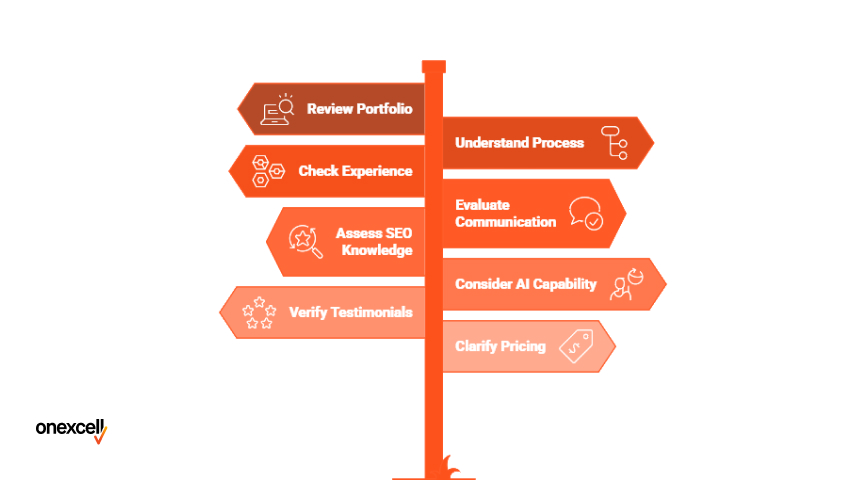
You choose a good website development company by checking their portfolio, understanding their process, and ensuring they align with your goals and budget. Look for a website development company that offers clear timelines, UK-based support, and works with both AI tools and custom development to deliver flexible, high-quality results.
Here are key tips to choose a good website development company:
- Review their portfolio and live projects: Look at recent websites they’ve built to see if their design style, functionality, and performance match your expectations. This gives you a real sense of their capabilities, not just what they promise.
- Ask about their development process: A reliable company should have a clear workflow, from discovery and planning to testing and post-launch support. This helps avoid delays and ensures every step is accounted for.
- Check for industry or platform experience: If you’re building an e-commerce site, for example, look for experience in Shopify or WooCommerce. Platform familiarity means faster delivery and fewer technical issues.
- Evaluate their communication and support: Are they responsive? Do they explain things clearly? Good communication is just as important as technical skill, especially during long-term projects.
- Assess their SEO and performance knowledge: The best developers understand how to build fast-loading, SEO-friendly sites. Ask if they handle things like structured data, image optimisation, and mobile responsiveness.
- Look for a blend of AI capability and custom skill: A modern agency should know how to leverage AI for speed without sacrificing quality. The ability to mix AI-assisted builds with manual refinement gives you flexibility.
- Verify testimonials or request client references: Honest reviews or case studies from real businesses add credibility. If possible, ask for direct client contacts to get unbiased feedback.
- Clarify pricing and what’s included: Make sure you know what you’re paying for — design, content, SEO, maintenance? Avoid vague proposals or unclear pricing structures.